> ## Documentation Index
> Fetch the complete documentation index at: https://www.osohq.com/docs/llms.txt
> Use this file to discover all available pages before exploring further.
# How to map relational data to facts
This guide assumes that you're familiar with:
* [Facts](/develop/facts/overview)
* [Polar](/develop/policies/overview)
* Relational database basics
Oso Cloud represents data as [facts](/reference/sdks/facts). Facts are flexible
enough to represent any authorization data, but it is not always obvious how to
translate your data into facts in Oso Cloud. As most developers are familiar
with relational databases, this guide will discuss how to map common relational data
structures to facts.
Facts define a trait of an entity. For example, something the entity is (e.g.
public, protected) or something it possesses (color, amount). Good fact names reflect this.
They look like `is_TRAIT` or `has_TRAIT`.
For example, if the fact expresses that an
entity is public, a good fact name would be `is_public`. If it expresses that an entity has a role, you should name it `has_role`.
Fact arguments provide the details that uniquely define the fact. The first
argument is the entity that the fact describes.
The fact `is_public(Repository:cool_app)` states that the `cool_app`
repository (the entity) is `public` (the trait).
These conventions will guide how facts are constructed in this guide.
We used the name of the repository here for illustration, but in practice
you'll usually refer to objects by their ID.
## Simple-valued fields
Simple-valued fields (e.g. fields that aren't foreign keys) describe an attribute of a subject. They can be represented by facts that take the form `is_FIELD_NAME` or `has_FIELD_NAME`.
### Boolean fields
Boolean fields express whether or not the attribute is true. They are the
simplest to convert to facts.
```
trait_name(entity)
```
We saw this above in the `is_public` example. Suppose a `repository` table with the following structure.
```
---------- repository -----------
| | | |
| id | name | is_public |
---------------------------------
| 1 | cool_app | TRUE |
| 2 | okay_app | FALSE |
---------------------------------
```
The trait we're interested in is whether or not a repository is public, which is expressed by the `is_public` field. The row with ID 1 describes the `cool_app` repository, for which the value of `is_public` is `TRUE`.
If you wanted to determine whether the `cool_app` repository is public in SQL, you'd write:
```sql theme={null}
SELECT is_public FROM repository
WHERE id=1
```
To express this same data as a fact using the convention above, you'd write
```polar theme={null}
is_public(Repository{"1"})
```
The name of this fact is the name of the trait (`is_public`) and the first
argument is the entity the fact describes (repository ID 1 named cool\_app).
Boolean fields are often named is\_SOMETHING. If the field name already starts
with `is` or `has` do not prepend it again to the fact name.
### Strings and numbers
Strings and numbers express traits that can be quantified (e.g. amount, weight)
or labeled (e.g. role, status). Unlike boolean facts, it is necessary to
specify the value of a string or number to define it. For instance, your
application may have users who have different roles (e.g. `admin`, `writer`, `read-only`).
You might express this as a string-valued `role` field on a User table.
```
------------ user --------------
| |
| id | name | role |
--------------------------------
| 1 | alice | admin |
| 2 | bob | read-only |
| 3 | charlie | writer |
--------------------------------
```
The trait is the role a user has which is expressed by the `role` field.
Y`alice` has the `admin` role, `bob` has the `read-only` role, and `charlie` has the `writer` role.
If you want to fetch `alice`'s role in SQL, you'd use this query:
```sql theme={null}
SELECT role FROM user
WHERE id=1
```
If you want to express `alice`'s role as a fact, there is more information
needed than the name of the trait and the identity of the entity. That approach works for boolean traits because they only have two possible values: `TRUE` and `FALSE`. If the fact exists, then the value is `TRUE`. If it doesn't, then the value is `FALSE`.
Since string and numeric traits have many possible values, the value of the
trait must be included in the fact. The fact `has_role(User:1)` indicates that
`alice` has *a* role. It doesn't indicate *which* role `alice` has.
The second argument of the fact provides that information: `has_role(User:alice, "admin")`.
Roles have [special
meaning](/reference/polar/resource-blocks)
in Polar. If roles are defined in a field called something other than `role`,
the associated fact should still be named `has_role`.
You can use this pattern for all traits that have a value:
```
trait_name(entity, trait_value)
```
Numbers are expressed almost identically to strings, except that the
`trait_value` is not quoted. You might have a `login_count` field to store the number of times a user has logged in.
```
------------------- user -------------------
| |
| id | name | role | login_count |
--------------------------------------------
| 1 | alice | admin | 100 |
| 2 | bob | read-only | 24 |
| 3 | charlie | writer | 15 |
--------------------------------------------
```
The user `bob` (ID 2) has a login count of `24`, so the fact expresses the
number of times `bob` has logged in as `has_login_count(User{"2"}, 24)`.
## Foreign keys
A foreign key is a reference to another table in a relational database. These references serve two major purposes:
1. **Lookups:** Lookup tables define values that are used repeatedly in other tables. For example, you may want to have a `role` table where each role name is defined a single time rather than repeating the names of the roles directly in your `user` table.
2. **Relationships:** The majority of foreign keys define relationships between two entities.
Lookup tables are similar to string-valued fields, so we'll start with those and then discuss relationships.
### Lookup tables
Rather than repeating the same values for strings that have system meaning like
roles and status, many teams will enumerate all the possible values of those
strings in a separate table.
For example:
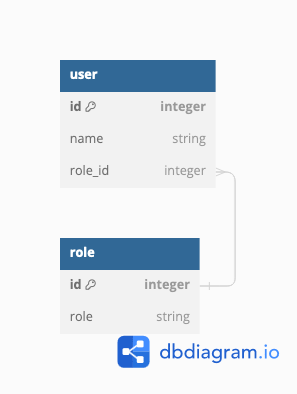 The role table defines the values of roles that are possible.
```
------ role ------
| |
| id | role |
------------------
| 1 | admin |
| 2 | writer |
| 3 | read-only |
------------------
```
With this pattern, the user table references the role by ID instead of a string.
```
---------- user ------------
| |
| id | name | role_id |
----------------------------
| 1 | alice | 1 |
| 2 | bob | 3 |
----------------------------
```
The SQL query to retrieve `alice`'s role now requires a `JOIN` statement:
```sql theme={null}
SELECT role FROM role
JOIN user on user.role_id = role.id
WHERE user.id = 1
```
`alice`'s role could be expressed in a fact by its ID: `has_role(User{"1"}, 1)`, but this is not desirable. This produces authorization rules that depend
on a specific role value. For example, a rule that states that users with the `admin` role get the `add_user` permission.
If you express roles using their names, the policy would look like the following.
```polar theme={null}
has_permission(user: User, "add_user") if
has_role(user, "admin");
```
If instead you use the role IDs to express the roles, then the policy would
look like the following.
```polar theme={null}
has_permission(user: User, "add_user") if
has_role(user, 1);
```
The first version is much easier to understand. Any onereading the second
version has to know which role corresponds to an ID. Thus, if lookup tables are
used to store strings that you use in your policy, store the strings as facts rather than their IDs.
The policy will be much easier to maintain.
### Relationships
Foreign keys express relationships between two entities. This section covers the most common:
* One-to-Many
* Recursive
* Many-to-Many
#### One-to-many relationships
A one-to-many relationship is a relationship where one entity may have a relationship to multiple other entities of a given type.
For example, to capture the owner of a repository, a foreign key expresses the
relationship between the `repository` table and the `user` table.
The role table defines the values of roles that are possible.
```
------ role ------
| |
| id | role |
------------------
| 1 | admin |
| 2 | writer |
| 3 | read-only |
------------------
```
With this pattern, the user table references the role by ID instead of a string.
```
---------- user ------------
| |
| id | name | role_id |
----------------------------
| 1 | alice | 1 |
| 2 | bob | 3 |
----------------------------
```
The SQL query to retrieve `alice`'s role now requires a `JOIN` statement:
```sql theme={null}
SELECT role FROM role
JOIN user on user.role_id = role.id
WHERE user.id = 1
```
`alice`'s role could be expressed in a fact by its ID: `has_role(User{"1"}, 1)`, but this is not desirable. This produces authorization rules that depend
on a specific role value. For example, a rule that states that users with the `admin` role get the `add_user` permission.
If you express roles using their names, the policy would look like the following.
```polar theme={null}
has_permission(user: User, "add_user") if
has_role(user, "admin");
```
If instead you use the role IDs to express the roles, then the policy would
look like the following.
```polar theme={null}
has_permission(user: User, "add_user") if
has_role(user, 1);
```
The first version is much easier to understand. Any onereading the second
version has to know which role corresponds to an ID. Thus, if lookup tables are
used to store strings that you use in your policy, store the strings as facts rather than their IDs.
The policy will be much easier to maintain.
### Relationships
Foreign keys express relationships between two entities. This section covers the most common:
* One-to-Many
* Recursive
* Many-to-Many
#### One-to-many relationships
A one-to-many relationship is a relationship where one entity may have a relationship to multiple other entities of a given type.
For example, to capture the owner of a repository, a foreign key expresses the
relationship between the `repository` table and the `user` table.
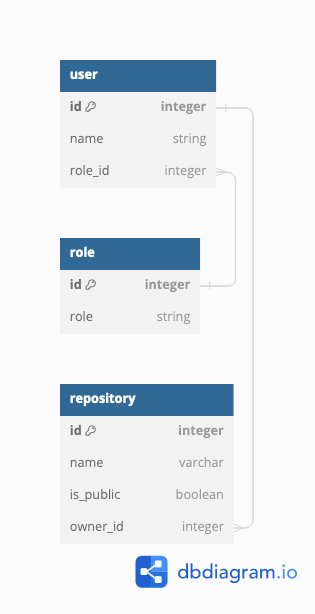 The owner of a repository is defined in the `owner_id` field of the `repository` table.
```
---------------- repository ----------------
| | | |
| id | name | is_public | owner_id |
--------------------------------------------
| 1 | cool_app | TRUE | 1 |
| 2 | okay_app | FALSE | 3 |
--------------------------------------------
```
This shows that `alice` is the owner of `cool_app` and `charlie` is the owner of `okay_app`.
This is an example of a one-to-many relationship. Each user will have exactly one record in the `user` table. But any given user may be the owner of multiple repositories, so there could be many rows in the `repository` table with the same `owner_id`.
Because the `owner_id` expresses a **relationship** between the `user` and `repository` tables, we use the name `has_relation` for the trait that this field defines.
Although we could have used the name `has_owner`, relations occur so often
in authorization logic that they have [special
meaning](/reference/polar/resource-blocks#permissions%2C-roles%2C-and-relations) to Oso. Whenever a fact defines
a relation between two entities, a good name is `has_relation`.
This makes it obvious from the policy that the fact represents a foreign key in the source database.
We use the same pattern to define the owner fact: `trait_name(subject, trait_value)`.
```polar theme={null}
has_relation(Repository{"1"}, "owner")
```
The `trait_value` for a relation is the name of the relation. More information
is needed to fully define the fact - User is the owner of the repository.
This SQL query returns the owner of the `cool_app` repository (user ID 1).
```sql theme={null}
SELECT owner_id
FROM repository
WHERE id = 1
```
We can call this user the *object* of the relation. Enter the third argument:
```polar theme={null}
has_relation(Repository{"1"}, "owner", User{"1"})
```
You might wonder why the repository is the subject instead of the user.
This is because the foreign key (`owner_id`) exists on the `repository` table,
so the primary key of the row that contains the foreign key identifies a
repository. For one-to-many relationships, it is natural to think of the
primary key as the subject and the foreign key as the object.
All facts that involve a subject and an object have this pattern:
```polar theme={null}
trait_name(subject, trait_value, object)
```
Because relationships are so common in authorization, it is worth reinforcing
that pattern:
```polar theme={null}
has_relation(subject, relation_name, object)
```
#### Recursive (self-referential) relationships
Recursive relationships are a special form of one-to-many relationship where
the foreign key refers to a field in its own table, usually the primary key.
Folder hierarchies are a common example. Folders may contain folders to arbitrary depths.
```
folder-1
|_folder-2
|_folder-3
|_folder-4
...
```
This can be expressed with a `folder` table that has a `parent_id` field that refers back to the `id` of another row in the table.
The owner of a repository is defined in the `owner_id` field of the `repository` table.
```
---------------- repository ----------------
| | | |
| id | name | is_public | owner_id |
--------------------------------------------
| 1 | cool_app | TRUE | 1 |
| 2 | okay_app | FALSE | 3 |
--------------------------------------------
```
This shows that `alice` is the owner of `cool_app` and `charlie` is the owner of `okay_app`.
This is an example of a one-to-many relationship. Each user will have exactly one record in the `user` table. But any given user may be the owner of multiple repositories, so there could be many rows in the `repository` table with the same `owner_id`.
Because the `owner_id` expresses a **relationship** between the `user` and `repository` tables, we use the name `has_relation` for the trait that this field defines.
Although we could have used the name `has_owner`, relations occur so often
in authorization logic that they have [special
meaning](/reference/polar/resource-blocks#permissions%2C-roles%2C-and-relations) to Oso. Whenever a fact defines
a relation between two entities, a good name is `has_relation`.
This makes it obvious from the policy that the fact represents a foreign key in the source database.
We use the same pattern to define the owner fact: `trait_name(subject, trait_value)`.
```polar theme={null}
has_relation(Repository{"1"}, "owner")
```
The `trait_value` for a relation is the name of the relation. More information
is needed to fully define the fact - User is the owner of the repository.
This SQL query returns the owner of the `cool_app` repository (user ID 1).
```sql theme={null}
SELECT owner_id
FROM repository
WHERE id = 1
```
We can call this user the *object* of the relation. Enter the third argument:
```polar theme={null}
has_relation(Repository{"1"}, "owner", User{"1"})
```
You might wonder why the repository is the subject instead of the user.
This is because the foreign key (`owner_id`) exists on the `repository` table,
so the primary key of the row that contains the foreign key identifies a
repository. For one-to-many relationships, it is natural to think of the
primary key as the subject and the foreign key as the object.
All facts that involve a subject and an object have this pattern:
```polar theme={null}
trait_name(subject, trait_value, object)
```
Because relationships are so common in authorization, it is worth reinforcing
that pattern:
```polar theme={null}
has_relation(subject, relation_name, object)
```
#### Recursive (self-referential) relationships
Recursive relationships are a special form of one-to-many relationship where
the foreign key refers to a field in its own table, usually the primary key.
Folder hierarchies are a common example. Folders may contain folders to arbitrary depths.
```
folder-1
|_folder-2
|_folder-3
|_folder-4
...
```
This can be expressed with a `folder` table that has a `parent_id` field that refers back to the `id` of another row in the table.
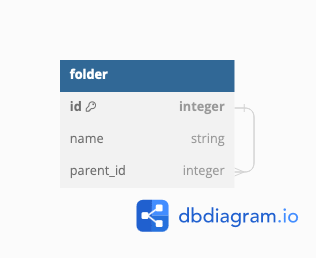 The hierarchy above would be represented like this:
```
---------- folder -----------
| |
| id | name | parent_id |
-----------------------------
| 1 | folder-1 | NULL |
| 2 | folder-2 | 1 |
| 3 | folder-3 | 2 |
| 4 | folder-4 | 1 |
-----------------------------
```
The parent relation can be expressed using `has_relation` facts with the same
battern from earlier in the guide. Since the `parent_id` field is the foreign key,
the primary key of the row that contains the `parent_id` (the child folder)
is the subject of the fact. The row that the `parent_id` refers to is the object
of the fact.
Thus, the fact expresses that `folder-2` has the parent `folder-1`, or:
```
has_relation(Folder{"2"}, "parent", Folder{"1"})
```
In Polar terms, a recursive relationship is expressed by a fact where the
subject and object have the same type.
#### Many-to-many relationships (JOIN tables)
Applications frequently model many-to-many relationships. In a multitenant
applicationi for exxample, users belong to organizations. As given user will
have different roles in different organizations, a user will not be associated
with a single role. Instead, a role will be associated with the combination
of a user and an organization. This can be expressed by creating a JOIN table
that defines a many-to-many relationship between users and organizations.
The hierarchy above would be represented like this:
```
---------- folder -----------
| |
| id | name | parent_id |
-----------------------------
| 1 | folder-1 | NULL |
| 2 | folder-2 | 1 |
| 3 | folder-3 | 2 |
| 4 | folder-4 | 1 |
-----------------------------
```
The parent relation can be expressed using `has_relation` facts with the same
battern from earlier in the guide. Since the `parent_id` field is the foreign key,
the primary key of the row that contains the `parent_id` (the child folder)
is the subject of the fact. The row that the `parent_id` refers to is the object
of the fact.
Thus, the fact expresses that `folder-2` has the parent `folder-1`, or:
```
has_relation(Folder{"2"}, "parent", Folder{"1"})
```
In Polar terms, a recursive relationship is expressed by a fact where the
subject and object have the same type.
#### Many-to-many relationships (JOIN tables)
Applications frequently model many-to-many relationships. In a multitenant
applicationi for exxample, users belong to organizations. As given user will
have different roles in different organizations, a user will not be associated
with a single role. Instead, a role will be associated with the combination
of a user and an organization. This can be expressed by creating a JOIN table
that defines a many-to-many relationship between users and organizations.
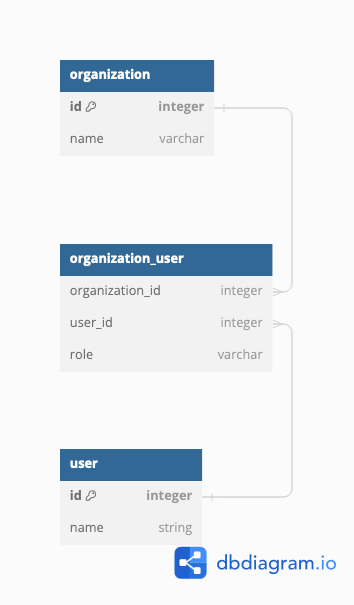 This structure assigns users to multiple organizations and gives them different
roles on each. For example, consider two organizations: `acme` and `banjo`. `alice` is an `admin` in `acme` and a `member` in `banjo`.
The JOIN table could be expressed like the following (assume the same user data
used throughout this guide where `alice` is user ID 1).
```
-- organization --
| |
| id | name |
------------------
| 1 | acme |
| 2 | banjo |
------------------
--------- organization_user ----------
| |
| organization_id | user_id | role |
--------------------------------------
| 1 | 1 | admin |
| 2 | 1 | member |
--------------------------------------
```
To retrieve a user's role, the organization is also needed.
This SQL query retrieves which role `alice` has on the `acme` organization.
```sql theme={null}
SELECT role FROM organization_user
WHERE organization_id = 1
AND user_id = 1
```
Expressing this relationship as a fact follows the pattern of pairing a fact with a subject and an object:
```polar theme={null}
trait_name(subject, trait_value, object)
```
The trait is the role. The subject (the entity that has the role) is `alice`.
The value is `admin`. The object (the entity on which `alice` has the role) is
the `acme` organization.
A fact expressing these three elements follows.
```polar theme={null}
has_role(User{"1"}, "admin", Organization{"1"})
```
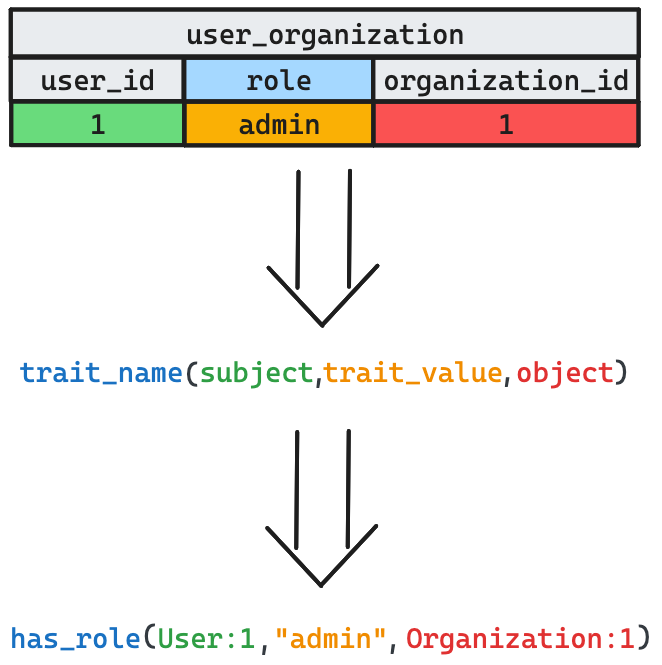
## Summary
You can visualize the mapping from relational data to facts like this:
This structure assigns users to multiple organizations and gives them different
roles on each. For example, consider two organizations: `acme` and `banjo`. `alice` is an `admin` in `acme` and a `member` in `banjo`.
The JOIN table could be expressed like the following (assume the same user data
used throughout this guide where `alice` is user ID 1).
```
-- organization --
| |
| id | name |
------------------
| 1 | acme |
| 2 | banjo |
------------------
--------- organization_user ----------
| |
| organization_id | user_id | role |
--------------------------------------
| 1 | 1 | admin |
| 2 | 1 | member |
--------------------------------------
```
To retrieve a user's role, the organization is also needed.
This SQL query retrieves which role `alice` has on the `acme` organization.
```sql theme={null}
SELECT role FROM organization_user
WHERE organization_id = 1
AND user_id = 1
```
Expressing this relationship as a fact follows the pattern of pairing a fact with a subject and an object:
```polar theme={null}
trait_name(subject, trait_value, object)
```
The trait is the role. The subject (the entity that has the role) is `alice`.
The value is `admin`. The object (the entity on which `alice` has the role) is
the `acme` organization.
A fact expressing these three elements follows.
```polar theme={null}
has_role(User{"1"}, "admin", Organization{"1"})
```
## Summary
You can visualize the mapping from relational data to facts like this:
 Much of the power of facts derives from their flexibility. This flexibility can
cause confusion when mapping relational data to facts. In this guide, we
reviewed some conventions that are helpful in expressing facts.
Though by no means comprehensive, these patterns cover the majority of
relational data structures in many applications:
* The pattern of a fact should be `trait_name(subject, [trait_value], [object])`
* The `trait_name` should take the form `is_TRAIT` or `has_TRAIT`
* The `subject` is the entity that has the trait (e.g. the user that has the role)
* You can also think of this as the row that has the field.
* The `trait_name` should mirror the name of the field that it corresponds to in most cases
* Two types of traits have special meaning
* Roles should always be called `has_role`
* Relations should always be named `has_relation`
* When using lookup tables to store the values of strings that have meaning to
your policy, use the values in
fact definitions, not the IDs.
* `has_role(User:1, "admin")` instead of `has_role(User:1, 1)`
* The object should be the the record that is referenced by the subject
* The parent folder
* The organization on which the user has a role
Much of the power of facts derives from their flexibility. This flexibility can
cause confusion when mapping relational data to facts. In this guide, we
reviewed some conventions that are helpful in expressing facts.
Though by no means comprehensive, these patterns cover the majority of
relational data structures in many applications:
* The pattern of a fact should be `trait_name(subject, [trait_value], [object])`
* The `trait_name` should take the form `is_TRAIT` or `has_TRAIT`
* The `subject` is the entity that has the trait (e.g. the user that has the role)
* You can also think of this as the row that has the field.
* The `trait_name` should mirror the name of the field that it corresponds to in most cases
* Two types of traits have special meaning
* Roles should always be called `has_role`
* Relations should always be named `has_relation`
* When using lookup tables to store the values of strings that have meaning to
your policy, use the values in
fact definitions, not the IDs.
* `has_role(User:1, "admin")` instead of `has_role(User:1, 1)`
* The object should be the the record that is referenced by the subject
* The parent folder
* The organization on which the user has a role