> ## Documentation Index
> Fetch the complete documentation index at: https://www.osohq.com/docs/llms.txt
> Use this file to discover all available pages before exploring further.
# Logs and auditing
> View and monitor authorization activity in Oso Cloud
**Monitor and audit all authorization activity in your application.**
Use Oso Cloud logs to:
* **Debug authorization issues** by inspecting request details
* **Audit access patterns** across your application
* **Verify data synchronization** between your app and Oso Cloud
## Logged activity
* **Read logs** - Authorization requests and queries
* **Write logs** - Updates to authorization data (facts)
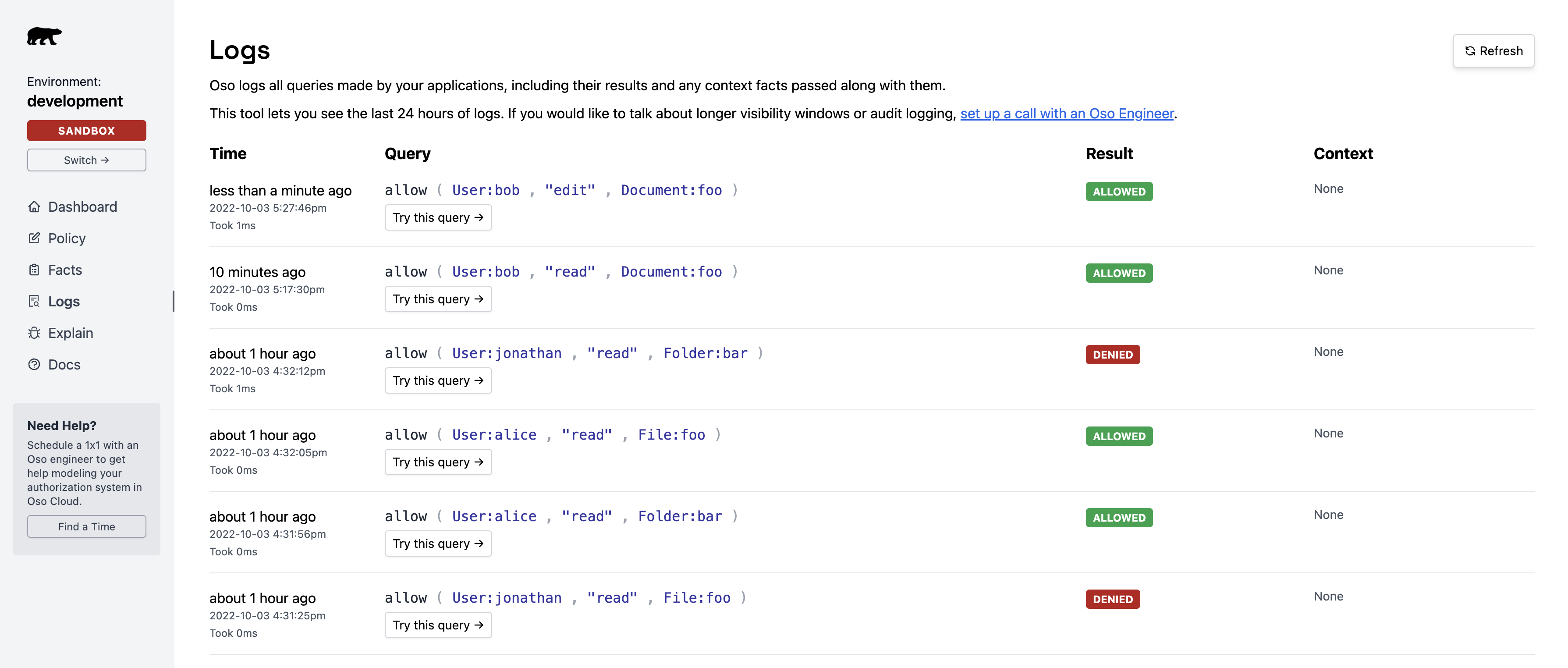
## Authorization request logs (reads)
**Track every authorization check** your application sends to Oso Cloud.
View logs in the [Logs page](https://ui.osohq.com/logs/):
 ### Log retention by plan
* **Free & Pro** - Last 24 hours
* **Growth** - 30+ days, with search
Log export isn't currently available. [Contact us](https://osohq.com/meet-oso?utm_content=export-read-logs) if you need this feature.
## Data write monitoring (Growth plan)
Get real-time visibility into whether Oso Cloud is receiving your application data using **webhook notifications**.
Available for Growth plan customers only.
Requires setup by an Oso engineer. [Contact us](https://join-slack.osohq.com/) to schedule configuration.
### When to use
Set up write monitoring if your application has complex data flows that make it difficult to confirm when facts reach Oso Cloud.
**Examples:**
* Multi-service architectures with async data updates
* Batch processes that insert or update facts
* Debugging unexpected authorization results
Oso Cloud calls your webhook whenever it receives fact updates.
### Current limitations
Webhooks **do not trigger** for:
* Data ingested via [Oso Sync](/develop/facts/sync-facts)
Webhooks **do not report**:
* Whether inserted data was new or already existed
* Exact facts deleted during a delete operation
* Guaranteed delivery (no infinite retries)
These limitations make webhooks unsuitable for compliance or archival use cases. [Contact us](https://join-slack.osohq.com/) to discuss enhanced options.
## Related guides
* **[Debug authorization issues](/develop/troubleshooting/debugging)** - Use Logs and Explain
* **[Understand Explain results](/develop/troubleshooting/explain)** - Analyze decisions
* **[Query performance](/develop/troubleshooting/query-performance)** - Optimize slow checks
### Log retention by plan
* **Free & Pro** - Last 24 hours
* **Growth** - 30+ days, with search
Log export isn't currently available. [Contact us](https://osohq.com/meet-oso?utm_content=export-read-logs) if you need this feature.
## Data write monitoring (Growth plan)
Get real-time visibility into whether Oso Cloud is receiving your application data using **webhook notifications**.
Available for Growth plan customers only.
Requires setup by an Oso engineer. [Contact us](https://join-slack.osohq.com/) to schedule configuration.
### When to use
Set up write monitoring if your application has complex data flows that make it difficult to confirm when facts reach Oso Cloud.
**Examples:**
* Multi-service architectures with async data updates
* Batch processes that insert or update facts
* Debugging unexpected authorization results
Oso Cloud calls your webhook whenever it receives fact updates.
### Current limitations
Webhooks **do not trigger** for:
* Data ingested via [Oso Sync](/develop/facts/sync-facts)
Webhooks **do not report**:
* Whether inserted data was new or already existed
* Exact facts deleted during a delete operation
* Guaranteed delivery (no infinite retries)
These limitations make webhooks unsuitable for compliance or archival use cases. [Contact us](https://join-slack.osohq.com/) to discuss enhanced options.
## Related guides
* **[Debug authorization issues](/develop/troubleshooting/debugging)** - Use Logs and Explain
* **[Understand Explain results](/develop/troubleshooting/explain)** - Analyze decisions
* **[Query performance](/develop/troubleshooting/query-performance)** - Optimize slow checks