> ## Documentation Index
> Fetch the complete documentation index at: https://www.osohq.com/docs/llms.txt
> Use this file to discover all available pages before exploring further.
# Oso Explain
> Understand why an authorization decision passed or failed.
Oso Explain shows every possible path an authorization check could take, including:
* **Required facts** for each path
* **Policy rules** applied during evaluation
* **Matching facts** from your current environment
Use it to debug unexpected results or confirm your authorization logic works as intended.
## How to use Explain
**Test any authorization scenario** by entering an actor, action, and resource.
**Example**: Does **alice** have **edit** permission on **Document:budget-2024**?
 ## Interface overview
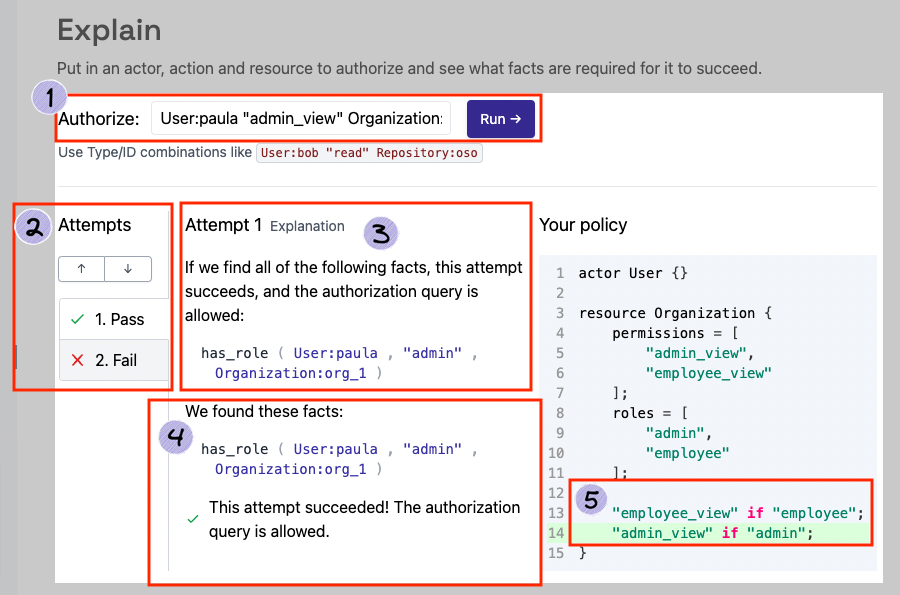
The Explain page has five main sections:
### 1. Run authorization checks
Enter your query:
1. **Actor** – e.g., `User:alice`
2. **Action** – e.g., `edit`
3. **Resource** – e.g., `Document:budget-2024`
4. Click **Run**
Results update automatically based on your input.
### 2. Authorization attempts
Explore all possible paths for the check:
* **✅ Pass** - Path succeeded
* **❌ Fail** - Path failed
Each attempt is a distinct way the check could succeed. Use arrows or tabs to navigate.
Multiple paths may succeed, but only one is required for the check to pass.
### 3. Required facts
**List the facts needed** for this path to succeed.
Each attempt shows a unique set of required facts. These show what **should exist** for authorization to pass, not necessarily what **currently exists** in your environment.
### 4. Matching facts
**Shows the facts** from your Oso Cloud environment that support this attempt. Empty for failed attempts.
Explain only shows facts stored in Oso Cloud. Facts resolved through [Local Authorization](/develop/facts/local-authorization) from your application databases won't appear here.
### 5. Relevant policy rules
**Displays the policy rule(s**) that enabled this attempt, so you can see exactly what logic was applied.
## Next steps
* **[Debug issues](/develop/troubleshooting/debugging)** - Use Logs and Explain together to investigate.
* **[Optimize query performance](/develop/troubleshooting/query-performance)** - Improve slow authorization checks
* **[Explore policy patterns](/develop/policies/overview)** - Learn common models and implementations
## Interface overview
The Explain page has five main sections:
### 1. Run authorization checks
Enter your query:
1. **Actor** – e.g., `User:alice`
2. **Action** – e.g., `edit`
3. **Resource** – e.g., `Document:budget-2024`
4. Click **Run**
Results update automatically based on your input.
### 2. Authorization attempts
Explore all possible paths for the check:
* **✅ Pass** - Path succeeded
* **❌ Fail** - Path failed
Each attempt is a distinct way the check could succeed. Use arrows or tabs to navigate.
Multiple paths may succeed, but only one is required for the check to pass.
### 3. Required facts
**List the facts needed** for this path to succeed.
Each attempt shows a unique set of required facts. These show what **should exist** for authorization to pass, not necessarily what **currently exists** in your environment.
### 4. Matching facts
**Shows the facts** from your Oso Cloud environment that support this attempt. Empty for failed attempts.
Explain only shows facts stored in Oso Cloud. Facts resolved through [Local Authorization](/develop/facts/local-authorization) from your application databases won't appear here.
### 5. Relevant policy rules
**Displays the policy rule(s**) that enabled this attempt, so you can see exactly what logic was applied.
## Next steps
* **[Debug issues](/develop/troubleshooting/debugging)** - Use Logs and Explain together to investigate.
* **[Optimize query performance](/develop/troubleshooting/query-performance)** - Improve slow authorization checks
* **[Explore policy patterns](/develop/policies/overview)** - Learn common models and implementations